Category: Meetup

  • A2 Hosting: Proud Sponsor of WordPress & the Nashville Community

    A2 Hosting: Proud Sponsor of WordPress & the Nashville Community

    At A2 Hosting, we’re a proud sponsor of WordPress groups around the globe and we’re excited to be the newest sponsor for WordPress Nashville. We decided to take the opportunity to introduce ourselves. We considered talking about our hosting packages and our history, but you can learn all about that on our site and on our About page. Instead we wanted to write about something that would really help WordPress Nashville users get to know us better. We thought we’d talk about what we, and likely you, care about most; how to get the fastest WordPress page load speeds.

    You might be asking yourself, “Do I need to bother with speeding up my site with high-speed internet being the de facto standard nowadays?” The answer for this question is, “Yes”. Believe it or not, there are still many Americans (and millions more worldwide) that are accessing the internet on slow connections, ranging from dial-up all the way down to the old 2G phone standard. Even some 3G and 4G carriers experience extreme slow-down when their network is being inundated with traffic requests.

    Studies have proven that the average website has less then 3 seconds in order to capture the attention of a potential customer. If your site is taking 5-10 seconds to load, the chances are you are losing a large number of customers or visitors each day due to your unoptimized website.

    If you are running an online store, it is crucial that you take the time needed to maximize your website efficiency. Otherwise, you might end up losing a customer and that can cost you hundreds (or even thousands) of dollars in lost revenue.

    At A2 Hosting, we offer an exclusive WordPress setup that does many tweaks and takes the guesswork out of how to get the fastest page load speeds possible. We call it A2 Optimized. Just visit our WordPress Hosting page, sign up for an account and it will comes pre-installed with an A2 Optimized WordPress install.

    Not ready to switch to A2 Hosting? You can also try a limited version of A2 Optimized regardless of where you’re hosting WordPress. You can add A2 Optimized to your account in about a minute. Here’s how:

    1. Click Plugins
    2. Click Add New
    3. Search “A2 Optimized”.
    4. Click Install Now
    5. Click Installed Plugins
    6. Click Activate under “A2 Optimized WP”

    A common mistake by many WordPress users is that they load their website down with a number of WordPress speed plugins. Unfortunately these plugins require so many resources and can work against each other that the opposite impact actually occurs. Below you’ll find tips on how to quickly and easily speed up your WordPress site.

    
Use a Caching Plugin


One of the features offered by WordPress that everyone seems to love are all the useful plugins that are available for the framework. Some of the best plugins available for webmasters looking to increase the speed of their sites are W3 Total Cache and WP Rocket. W3 Total Cache generates static cache pages for each page that is loaded so they are not being dynamically loaded for every page load. This vastly decreases your site’s load time while increasing performance. You should notice a solid performance boost when these plugins are installed and running. Are you trying out A2 Optimized? W3 Total Cache comes installed and configured on your account for the easiest setup.

    
Optimize Your Images


Images can slow down a site. You can optimize images in your graphic editor such as Photoshop or GIMP, but if you have a large site that is already online and getting traffic, the last thing you want to do is have to go through several hundred images to reduce their file size. EWWW Image Optimizer (also installed within A2 Optimized) can help you bulk optimize your images. It improves page load times especially for sites with many images.

    Minify” That Javascript

    
Chances are your site is using one or more JavaScript plugins on it. While some of these are designed from the start to be as efficient as possible, there are plenty of others that are coded quickly with little thought to loading times. For these situations, you are going to want to minify the script(s). This means to compress the JavaScript code. There are plenty of solutions online that can minify the code for you. In addition to its caching ability, W3 Total Cache can handle this task for you. Once again, W3 Total Cache is included with the A2 Optimized plugin so there’s nothing to worry about if you decide to use this plugin for your site.


    Activate “LazyLoad” for Your Images


LazyLoad is a method employed to help reduce page-load times by only downloading the images that appear above the fold. As the reader scrolls down, the script will begin to automatically load the other images as they come into view. If you have integrated an image optimization plugin, you should be able to shave at least significant time off your overall loading times. LazyLoad is available with the previously mentioned WP Rocket option. While WP Rocket is not a free plugin, A2 Hosting customers do receive a 20% discount.


    Thank you for taking the time to read through our WordPress optimization tips! A2 Hosting is excited to be a WordPress Nashville sponsor and we look forward to working with its members.

    63A2A848-BD48-4816-9341-8AAC15E9DD53@neo.rr.com

  • Meetup: Your backup plan needs a wingman: Backup Buddy 101

    Meetup: Your backup plan needs a wingman: Backup Buddy 101

    If you have a self-hosted WordPress site that is not using managed hosting, you need a backup solution! BackupBuddy, by iThemes, is useful for both beginner-level users as well as developers to create backups of your site that can be used for site migration, site staging, or site restoration.

    Updated 7-22

    Slide Desk: http://www.slideshare.net/DnelleDowis/nashville-wordpress-meetup-ithemes-backup-buddy

    Join us for a tour of the BackupBuddy 7.1 dashboard. You’ll learn how to configure the plugin, make your first backup, configure an automated backup schedule, and use the backup file to restore the site in a new location.

    We’ll also touch on the BackupBuddy Stash Live feature that works with iThemes Sync if we have time.

    Come prepared with questions about how to best use BackupBuddy for your site or business. The iThemes folks have sent some stickers and have even offered to send a t-shirt to a couple lucky attendees. Walk away with some swag and the power to keep your WordPress site clean and happy!

    Our Sponsor

    LGO-WPEngine-Horiz-reg-CMYK

  • Meetup: All Levels: Code Night – Anatomy of a Theme

    Meetup: All Levels: Code Night – Anatomy of a Theme

    Join us for a hands-on coding series where we will be working through the anatomy of a WordPress theme.

    RSVP: http://www.meetup.com/NashvilleWordpress/events/231699474/

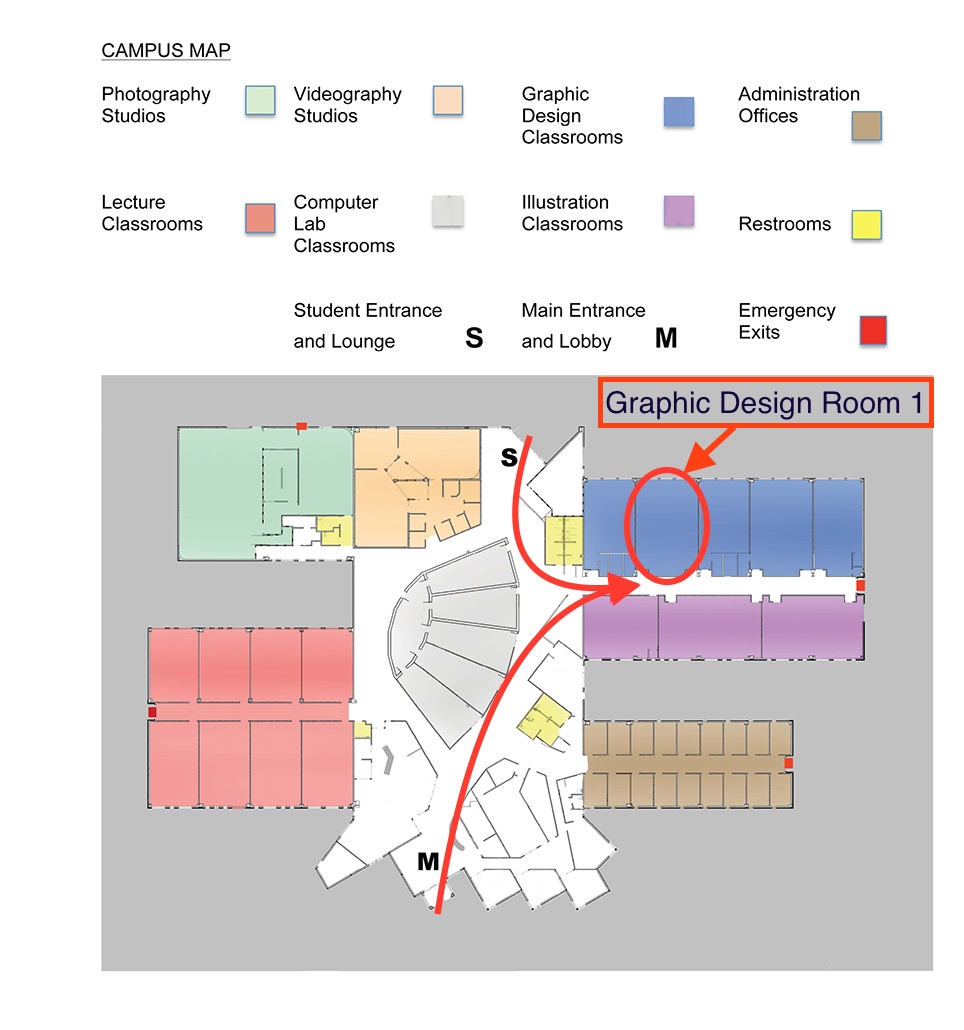
    We will be meeting in the Graphic Design Room 1. Please see the map below for specific details on how to get to the room from the parking lot. Download the map

    We will be using the book “Professional WordPress, Design and Development” and starting from Chapter 9, which focuses on theme development. We are going to follow along with the book so anyone can join at any point and have all the materials they need in one easy spot. The book is not required, but it will help. A paperback version is suggested over the digital version.

    The goal of this meetup is to offer a simple presentation on working with theme code. After the presentation we’ll be doing q&a on the materials we covered and the technologies used. After we have answered all the question on the materials, we’ll move into a more general q&a where we’ll try to fix issues for attendees.

    Book we are going to follow:
    Professional WordPress, Design and Development
    Chapter 9: Theme development

    A shout out to our sponsor A2 Hosting!

    “Whether you’ve never run a website before or are a professional developer, rest assured we have a web hosting solution to meet your unique needs!”

    https://www.a2hosting.com/

    A shout out location host Nossi College of Art

    “Dedicated to preparing students for the vast and exciting business of visual communications.”

    http://nossi.edu/

    Directions to “Graphic Design Room 1”

    Nossi Campus Map

  • Meetup: Comparing WooCommerce and Shopify for WordPress E-Commerce

    Meetup: Comparing WooCommerce and Shopify for WordPress E-Commerce

    We’ll be discussing the in’s and out’s of different e-commerce solutions that are common within the WordPress ecosystem. WooCommerce will represent a built-in e-commerce solution, while Shopify will represent an external solution. From styling to ease-of-integration, we’ll talk about the strengths and weaknesses of both and which one to choose when for your e-commerce build-outs.

    Updated: Here is the link to the slide deck pdf
    http://wpnashville.com/wp-content/uploads/2016/05/E-Commerce-Options-for-WordPress.pdf

  • Meetup: Installing WordPress: Server Side Setup

    Meetup: Installing WordPress: Server Side Setup

    Learn how to manually install and set up WordPress on your domain server. To follow along, bring your laptop with a FTP program and an empty domain to work with (a domain with no other files installed on it).

    Post-meetup followup:

    Slide deck link – https://drive.google.com/file/d/0BxH3oaIsfI-jVDFzeC1udnVtNjg/view?usp=sharing

    btn-meetup-rsvp

  • Meetup: Automating WordPress Without Code

    Meetup: Automating WordPress Without Code

    How to automatic task, post, and social sharing with your WordPress site without writing any code or plugins.

    btn-meetup-rsvp

    Followup: 03-24
  • Meetup: Build your Mailing List

    Meetup: Build your Mailing List

    Interact more with your fans! Sell more to your customers!

    We’ll go over why newsletters are more important than ever, some of the tools for managing your mailing list, and how to best use your WordPress site to take advantage of them.

    btn-meetup-rsvp

  • Calypso: The new WordPress.com admin & why you should know more!

    Calypso: The new WordPress.com admin & why you should know more!

    We are going to be exploring the new WordPress.com admin Calypso! There have been some major changes which make this important for all WordPress users.

    Even if you have a self hosted WordPress site you need to know about the new WordPress.com admin Calypso and what it can do for you right now and in the future!

    Monday, January 18, 2016
    7:00 PM to 8:30 PM
    440 E Iris Dr, Nashville, TN

    RSVP »

    A few related links:

    • Calypso: https://developer.wordpress.com/calypso/

    • Automattic unveils open source wordpress desktop application for the mac

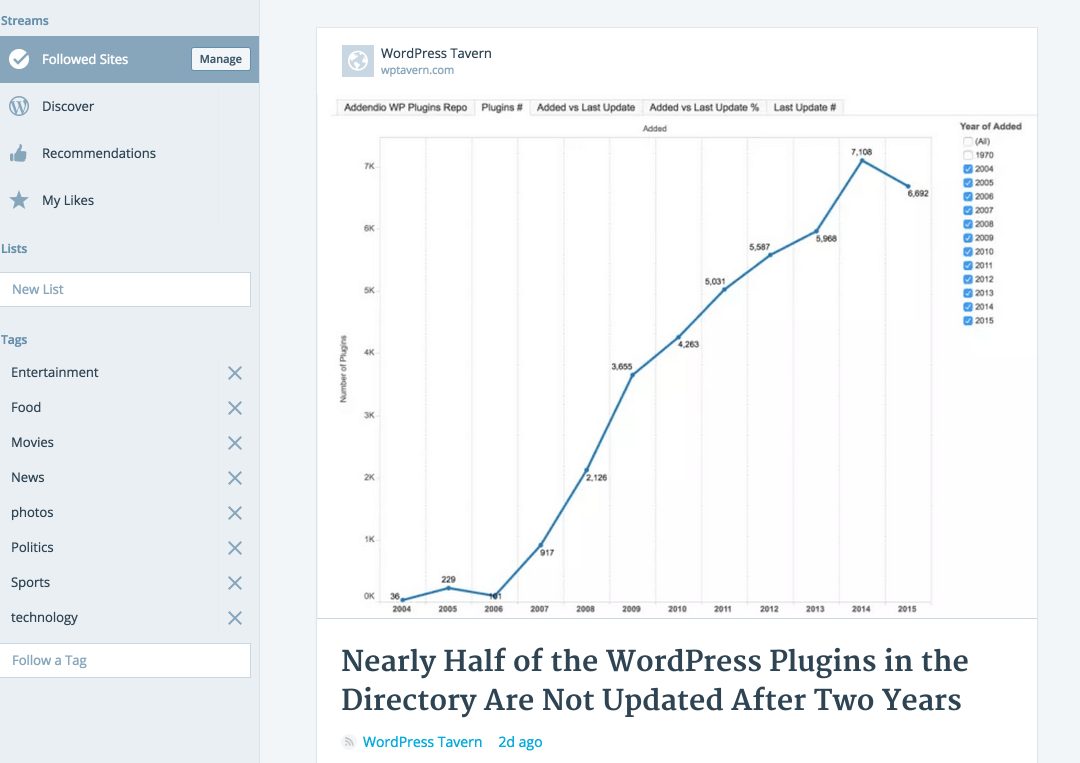
    Calypso1

  • February Developers Social: Code & Breakfast Re-cap­

    February Developers Social: Code & Breakfast Re-cap­

    February was a good turnout for the group, breakfast was a success! If you were not able to make the meetup check out the link notes below. If you are looking for a way to get connected with the community and are having a hard time making it out to the meetups you can join us on slack.

    General

    • http://member.wishlistproducts.com/
    • http://wpmegamenu.com/

    Git

    • http://buildamodule.com/video/change-management-and-version-control-deploying-releases-features-and-fixes-with-git-how-to-use-a-scalable-git-branching-model-called-gitflow#viewing
    • http://scottchacon.com/2011/08/31/github-flow.html

    Vagrant

    • https://github.com/Varying-Vagrant-Vagrants/VVV
    • http://code.tutsplus.com/tutorials/creating-a-professional-wordpress-development-workflow-with-vagrant–cms-21121

    SCSS

    • https://wordpress.org/plugins/wp-scss/
    • http://sass-lang.com/guide

    responsive

    • https://github.com/benschwarz/metaquery
    • http://glenmaddern.com/articles/metaquery-and-the-end-of-media-queries

    text editors

    • https://panic.com/coda/
    • http://www.sublimetext.com/3
    • https://atom.io/
    • http://macromates.com/

    General dev products

    • https://incident57.com/codekit/
    • https://panic.com/
    • http://www.mamp.info/en/
    • http://www.pixelmator.com/
    • http://bohemiancoding.com/sketch/
    • http://www.adobe.com/products/photoshop-elements.html