Category: Presentations

  • Meetup: Your backup plan needs a wingman: Backup Buddy 101

    Meetup: Your backup plan needs a wingman: Backup Buddy 101

    If you have a self-hosted WordPress site that is not using managed hosting, you need a backup solution! BackupBuddy, by iThemes, is useful for both beginner-level users as well as developers to create backups of your site that can be used for site migration, site staging, or site restoration.

    Updated 7-22

    Slide Desk: http://www.slideshare.net/DnelleDowis/nashville-wordpress-meetup-ithemes-backup-buddy

    Join us for a tour of the BackupBuddy 7.1 dashboard. You’ll learn how to configure the plugin, make your first backup, configure an automated backup schedule, and use the backup file to restore the site in a new location.

    We’ll also touch on the BackupBuddy Stash Live feature that works with iThemes Sync if we have time.

    Come prepared with questions about how to best use BackupBuddy for your site or business. The iThemes folks have sent some stickers and have even offered to send a t-shirt to a couple lucky attendees. Walk away with some swag and the power to keep your WordPress site clean and happy!

    Our Sponsor

    LGO-WPEngine-Horiz-reg-CMYK

  • Meetup: All Levels: Code Night – Anatomy of a Theme

    Meetup: All Levels: Code Night – Anatomy of a Theme

    Join us for a hands-on coding series where we will be working through the anatomy of a WordPress theme.

    RSVP: http://www.meetup.com/NashvilleWordpress/events/231699474/

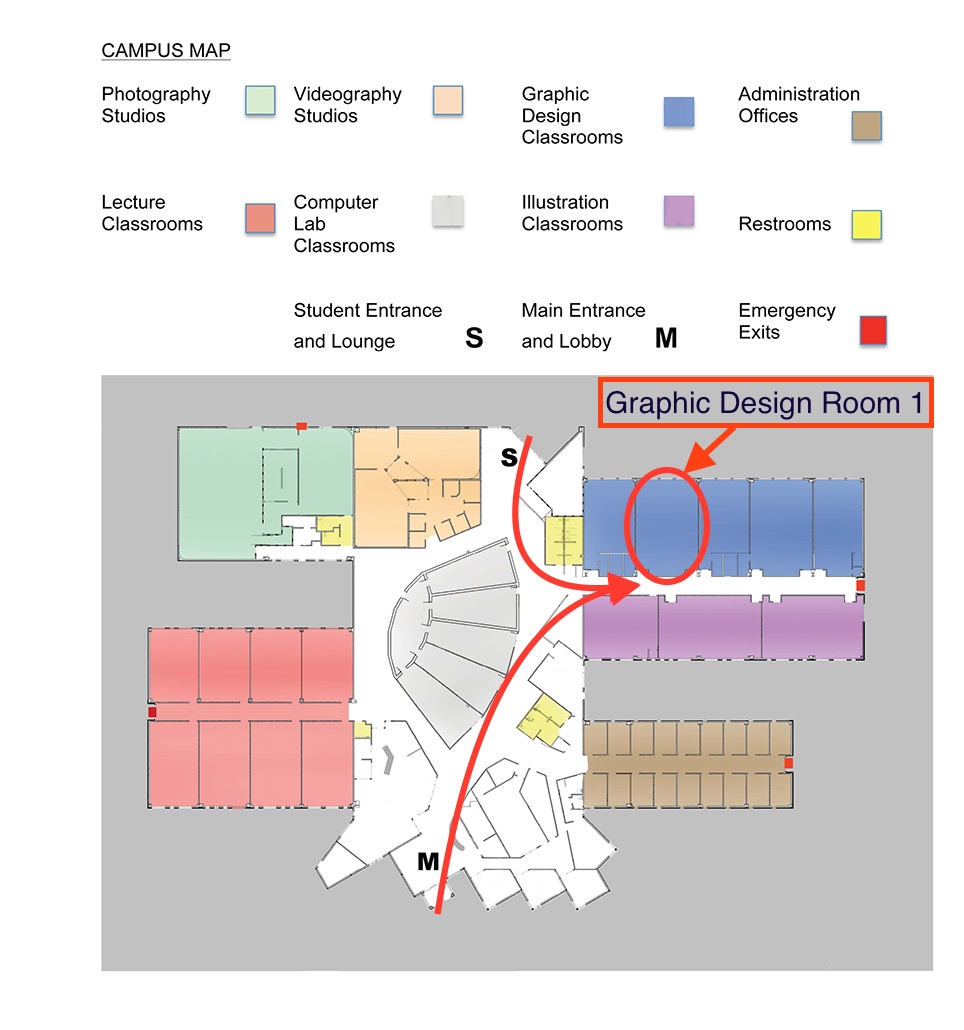
    We will be meeting in the Graphic Design Room 1. Please see the map below for specific details on how to get to the room from the parking lot. Download the map

    We will be using the book “Professional WordPress, Design and Development” and starting from Chapter 9, which focuses on theme development. We are going to follow along with the book so anyone can join at any point and have all the materials they need in one easy spot. The book is not required, but it will help. A paperback version is suggested over the digital version.

    The goal of this meetup is to offer a simple presentation on working with theme code. After the presentation we’ll be doing q&a on the materials we covered and the technologies used. After we have answered all the question on the materials, we’ll move into a more general q&a where we’ll try to fix issues for attendees.

    Book we are going to follow:
    Professional WordPress, Design and Development
    Chapter 9: Theme development

    A shout out to our sponsor A2 Hosting!

    “Whether you’ve never run a website before or are a professional developer, rest assured we have a web hosting solution to meet your unique needs!”

    https://www.a2hosting.com/

    A shout out location host Nossi College of Art

    “Dedicated to preparing students for the vast and exciting business of visual communications.”

    http://nossi.edu/

    Directions to “Graphic Design Room 1”

    Nossi Campus Map

  • Meetup: Comparing WooCommerce and Shopify for WordPress E-Commerce

    Meetup: Comparing WooCommerce and Shopify for WordPress E-Commerce

    We’ll be discussing the in’s and out’s of different e-commerce solutions that are common within the WordPress ecosystem. WooCommerce will represent a built-in e-commerce solution, while Shopify will represent an external solution. From styling to ease-of-integration, we’ll talk about the strengths and weaknesses of both and which one to choose when for your e-commerce build-outs.

    Updated: Here is the link to the slide deck pdf
    http://wpnashville.com/wp-content/uploads/2016/05/E-Commerce-Options-for-WordPress.pdf

  • Meetup: Installing WordPress: Server Side Setup

    Meetup: Installing WordPress: Server Side Setup

    Learn how to manually install and set up WordPress on your domain server. To follow along, bring your laptop with a FTP program and an empty domain to work with (a domain with no other files installed on it).

    Post-meetup followup:

    Slide deck link – https://drive.google.com/file/d/0BxH3oaIsfI-jVDFzeC1udnVtNjg/view?usp=sharing

    btn-meetup-rsvp

  • Meetup: Automating WordPress Without Code

    Meetup: Automating WordPress Without Code

    How to automatic task, post, and social sharing with your WordPress site without writing any code or plugins.

    btn-meetup-rsvp

    Followup: 03-24
  • Meetup: Build your Mailing List

    Meetup: Build your Mailing List

    Interact more with your fans! Sell more to your customers!

    We’ll go over why newsletters are more important than ever, some of the tools for managing your mailing list, and how to best use your WordPress site to take advantage of them.

    btn-meetup-rsvp

  • Redefining the Limits of WordPress

    Redefining the Limits of WordPress

    Blogging, Content Management and Beyond

    As we mentioned earlier this week we have a great meetup happening at the end of the month, however we never mentioned who was speaking. The team over at @athleticsnyc put together a great roster for the night. Be sure to RSVP on meetup »

    btn-rsvp-meetup

    Jameson Proctor, Partner, Athletics

    Make / Model: Rapid Prototyping with WordPress and Twig

    JamesonProctorBio: Jameson Proctor received his first computer, a hand-built Apple II+ clone, from his Grandaddy during the dawn of the personal computer revolution of the 1980s. He spent a good deal of his teenage years learning Applesoft BASIC and Fortran.

    Since then, Jameson has built predictive supply chain tools for the restaurant industry, iOS control applications for music performance and robotics and numerous PHP web applications for industries ranging from fashion retail and the arts to digital publishing.

    WordPress has been his platform of choice for years powering such Athletics projects as Thought Catalog, Creative Time, Everytown, American Theatre Wing and Ideas Never Sleep.

    Dale Liszka, Rockhouse Partners

    WordPress: Off the Web and Straight to Your Inbox

    DaleLiszkaBio: Dale has been working with WordPress since Ella made her debut in 2007. With years of prior backend PHP development experience he has been there first hand to see WordPress move from a simple blogging tool to a reliable CMS. Along the way he has had the opportunity to use it in high scale environments and even teach it a few new tricks.

    Mark Kelnar, Lead Engineer, WP Engine Labs

    The Road to HHVM: How will it effect the future of WordPress

    MarkKelnarBio: With over a decade and a half of software development experience, Mark is having the time of his professional life being a part of the WP Engine team. He says “every skill and experience he has previously had, culminates to everything he’s working on at WP Engine”. He also says that real life sometimes gets in the way of his WP Engine, but don’t tell his wife and two sons.

    Mark is currently the lead engineer on the WP Engine Labs team. Heading up research into new technologies that could make in into the WP Engine platform. Sometimes things catch on fire.

    RSVP on Meetup

    btn-rsvp-meetup

  • Nashville’s June WordPress Meetup

    Nashville’s June WordPress Meetup

    Over the course of the last year of meetups we’ve been ask time and time again about plugins. This month I decided to present a handful of plugins that I’ve used over the years, and some that I’ve found helpful for specific situations.

    Please, always to your own homework on a plugin before installing it. If possible I suggest installing plugins on a test site before installing on your main site. This will allow you to keep you database clean while testing out plugins. It will also keep you further from harms way if you happen to activate a dangerous plugin.

    Here is the text version of the presentation:

    WordPress Plugins

    5 plugins you be glad to know about, and few you may like.

    How to spot a good plugin

    1. Check the Plugin Details:
      You will find the plugin details to the right side of the plugin page. Looking at these is a must, you do not want to download an old plugin or an incompatible one.

      • Requires: 3.1 or higher
      • Compatible up to: 3.4
      • Last Updated: 2012-6-19
      • Downloads: 1,564,366
    2. Check the Plugin stats
      There will be a stats tab on the plugin page that will allow you to see the monthly or weekly stats of plugin.

    Utility Plugins

    Backup Plugins

    Google Analytics Plugins

    Specialty Plugins

    Group suggestions

    A few plugins were tossed around in the Q&A. Here they are.

  • Widgets, Custom Menus & Settings Pages

    Widgets, Custom Menus & Settings Pages

    This month at the Nashville Meetup we walked through the 3 sections of the WordPress admin. Widgets, Custom Menus & Settings Pages. Now, because there is already a wealth of WordPress knowledge out there I decided to find some well done tutorials on the subjects.

    There were to very well done tutorials done by Deltina Hay who has put a lot of time and effort into these these. (they are well worth the watch, or listen if you have other things todo) As for the settings pages we simply went through each page and clicked on all the options and updated all the fields to see how they effected our test site.

    I believe that learning WordPress is much like learning any other web application. Learn from trial and error, word of mouth and doing your home work. (search the web at all hours of the night to find that one bit of information to complete your masterpiece)

    Widgets & Sidebar

    By Deltina Hay

    This tutorial is a bit long because she goes into a lot of detail.

    [youtube width=”630″ height=”380″]http://www.youtube.com/watch?v=rM3XfwxjQ-4[/youtube]

    Custom Menus Tutorial

    By Deltina Hay
    This tutorial starts off a little slow but only because she does a great job of going through step by step. This is perfect for those of you have not yet worked with the WP Custom Menus.

    [youtube width=”630″ height=”380″]http://www.youtube.com/watch?v=oDW8OTDUIDI[/youtube]

  • Transferring WordPress from Server to Server

    Meetup Presentation 08-09-11

    Required

    • wp admin access
    • ftp access or control panel access
    • phpmyadmin access or database access
    • Domain Names are all ready in place and pointing in the right direction.

    Basic Outline

    1. Download WP
    2. Export SQL
    3. Upload WP
    4. Import SQL
    5. Update DB

    Download WP
    Download your all files that in the directory where WordPress is located. Most of the time this will be your root directory. Optionally, if you have a control panel like cPanel, you can use compress all the wp-files in to one compressed file to make this process extremely faster and easier.

    Download SQL
    Export your current database. You may do this from either phpmyadmin or if you do not have access you can use a plugin like WP-DB-Backup.

    Upload WP
    Upload the your files or your zipped file. If you zipped your file you will need to decompress the file and be sure that the wp-files reside in the directory you intended them to be in.

    Import SQL
    Access your database via phpmyadmin or another database application. Import the sql file that you exported. If your exported file is a zip be sure to decompress it before uploading.

    Update DB
    The tricky part. Start by doing a search for the old-domain this will allow you to see exactly how many changes are going to be needed and where they are at.

    NOTE: From my experience the method we are using will not work on serialized data so be sure not to run the following script on any row that uses a serialized format to store data.

    Here are the two most common sql sting you will need. As a personal note, I NEVER run this type of sql on the options table. I do those manually, typically there are only about 4 values that need changing. Notice that I am only using the bear necessities for the domain name. there is no http:// or training slash. Keep it simple and strait to the point. The only time you may need extra is if you are dealing with an installation that has been placed in a sub/directory.

    UPDATE wp_posts SET post_content = replace( post_content, 'old-domain.com', 'new-domain.com' ) ;
    UPDATE wp_posts SET guid = replace( guid, 'old-domain.com', 'new-domain.com' );

    To perform these lines of sql click on the sql tab of the phpmyadmin and enter these lines into the textarea. Hit Go! The admin will notify you of your updated rows.

    I like to keep an ongoing file that holds all the different type of updates I’ve done to make workflow faster. UPDATE sql